Driving Rules Interpreter · Visual-field Engine

Device
1Select device

2Mark missed points on the grid below.

Tip: hold the mouse button down and drag to mark multiple points at once.Tip: keep your finger on the screen and drag to mark multiple points at once

Use arrow keys to move between visual-field points. Press Space or Enter to toggle the selected point. Press M to mark missed or S to mark seen.

10°20°30°40°50°60°70°80°SuperiorInferiorLR±10° horizontal measurement zone+10°-10°
Seen 120Missed 0

3Enter test details

Licence class

State/Territory

Enter test detailsReview VA, Esterman type, reliability, fixation and notes before generating the report.
Esterman type

Esterman type

Vision status

Vision status

Visual acuity

Test reliability

Enter values from the visual field printout below.

Reliable if ≤ 20%%
Where to find this

Humphrey HFA: use the false-positive percentage in the reliability summary near the top of the Esterman printout; do not enter fixation losses here.

Enter the false-positive score as a percentage. If the report prints a fraction such as 1/17, convert it before entry. Above 20% is unreliable.

Fixation monitoring

Fixation guidance

Humphrey binocular Esterman note: automatic fixation monitoring is not available for Humphrey HFA binocular Esterman tests. If the technician monitored fixation manually and documented it, select Yes.

Details if considering a conditional licenceUse only for documented borderline, longstanding, monocular, or authority-review context.
Helpful context: tick only known or discussed points
Workflow guideStep-by-step guide for first-time users
1

Mark missed points

On the grid, click each point the patient missed on their visual field test.

2

Enter test details

Set state/territory, licence class, field layout, printout source, acuity, fixation monitoring, and false-positive rate.

3

Generate report

Run the Austroads assessment, review the verdict and rule basis, then print or save the report for the clinical record.

Prefer to watch? 90-second walkthrough on YouTube. It covers marking missed points, confirming reliability, running the assessment, and printing the report.

Learning and CPD CentreStructured CPD Module and practical learning topics for driving visual fields.

CPD Module

A 60-minute guided learning module with cases, questions, reflection prompts, and a printable CPD Activity Completion Certificate.

Learning Centre Search

Popular searches

Learning article library

10 deeper clinical guides

Long-form clinician-to-clinician articles that sit beside the practical Learning Centre topics below.

Open full article library

Esterman interpretation - 8 min read

Central visual-field loss and driving assessment

How central visual-field defects affect driving assessment, why pattern matters more than simple point count, and when central loss should trigger manual review.

Clinical learning topics

Below are practical learning materials covering key driving visual-field topics, including Esterman testing, printout checks, Austroads rules, special cases, and common interpretation traps.

Driving-field context and test choice

This quick guide helps decide when a screening field is enough, and when a formal Esterman or equivalent is the safer way to answer the driving-licence question.

Normal visual-field context

Key factNormal binocular horizontal field is much wider than the minimum licensing thresholds.

Healthy monocular fields are wide, but the binocular field is wider still. Austroads describes that the binocular field is approximately 200 degrees horizontally, with the central overlapping field supporting stereopsis.

  • This is why a driving-field assessment is usually interested in the combined functional field, not just each eye in isolation.
  • A normal field has substantial temporal, nasal, superior, and inferior reach, but the licensing question is whether the remaining field meets the Austroads driving standard.
  • Do not estimate the standard from anatomy alone. Use the actual test result when any defect, risk factor, or progressive disease is present.

Confrontation is only a screen

Key factAustroads allows confrontation screening, but it does not define a step-by-step confrontation technique.

Confrontation can be a minimum screen when there is no clinical indication of visual-field impairment and no progressive eye condition.

  • Austroads says confrontation is satisfactory only as a screen when there is no clinical indication of visual-field impairment and no progressive eye condition; it also says confrontation is an inexact test.
  • Austroads does not define the exact bedside technique. Use the usual clinical method: sit face-to-face at a similar eye level and distance, have the patient fixate your eye or nose, and compare their responses with your own field.
  • Test one eye at a time with the other eye occluded. Present fingers or a small moving target in each quadrant and from the periphery toward fixation; ask the patient to report movement or finger number while maintaining fixation.
  • If confrontation suggests a defect, or the history/examination raises concern, formal perimetry should be performed.
  • Confrontation is not precise enough to measure 90, 110, or 140 degree driving thresholds.
  • A progressive condition that could affect driving should not be cleared by confrontation alone.

When monocular automated static perimetry may be enough

Key factMonocular static perimetry is a low-risk rule-out pathway, not a way to measure a suspicious driving field.

Monocular automated static perimetry may be sufficient when there are no symptoms, family history, risk factors, progressive eye disease, or field concerns, and the static field shows no defect.

  • This is a rule-out pathway, not a way to measure a suspicious driving field.
  • If monocular static perimetry shows a significant defect, move to binocular Esterman or a validated equivalent.
  • For a monocular patient, Transport for NSW may require the field to be reported in degrees, so an Esterman or equivalent is often the cleaner practical test in NSW even when testing the functioning eye.

When an Esterman or equivalent is the cleaner test

Key factIf there is a significant defect, progressive disease, or a degrees-based report is needed, use binocular Esterman or a validated equivalent.

Use binocular Esterman or a validated equivalent when there is a suspected peripheral defect, a significant monocular static-perimetry defect, a progressive condition with driving relevance, or a need to report the field in degrees.

  • Austroads allows alternative devices only when they can show the required tested spots and fixation monitoring.
  • The Optometry NSW/ACT guide gives Medmont binocular visual field printed in Level Map Mode as an example of an Esterman-equivalent approach.
  • If the device, layout, or tested locations are uncertain, use manual review rather than treating the printout as automatically equivalent.
Esterman basics

The core vocabulary: what the printout is showing, what Esterman-equivalent means, and why the device name is not enough by itself.

Start here: what the printout is showing

For clinicians who are comfortable with fields, but new to driving-field language.

The first step is separating the machine, the test pattern, and the printed result. Most confusion comes from mixing those three things together.

Esterman is a test pattern, not a machine

Key factThe brand of perimeter does not prove that the tested locations match the driving-field layout.

  • A Humphrey, Medmont, Octopus, MMD VF2000 NEO, Optopol, Henson, or MRF is a perimeter or software platform.
  • An Esterman is a binocular visual-field test pattern used to sample driving-relevant visual field locations.
  • A printout can come from many devices, but DRIVE Fields needs to know whether the tested points match a supported driving-field layout.

What does standard binocular Esterman mean?

Key factA standard binocular Esterman is the reference Humphrey-style binocular Esterman test pattern used by Austroads.

  • Austroads describes the binocular Esterman as classically performed on a Humphrey visual field analyser, but allows other machines if they can monitor fixation and test the same spots as the standard binocular Esterman.
  • This is why not every result labelled Esterman is automatically the same thing. The important checks are binocular testing, the tested locations, fixation evidence, false-positive reliability, and whether the licensing authority accepts that device pathway.
  • Some devices use a true Humphrey-style 120-point layout; some use a different native driving-field layout; some add extra points. DRIVE Fields keeps unconfirmed pathways in manual review when same-spot equivalence or licensing acceptability has not been shown.

What Esterman-equivalent means

Key factEquivalent means the tested spots and reliability checks are suitable, not just Esterman-branded.

  • Esterman-equivalent means the printout is not necessarily from a Humphrey Esterman, but the tested locations match the standard binocular Esterman, the MRF 124-point layout, or another accepted driving-field layout.
  • It is not enough for a device to use the word Esterman. The printout still needs binocular testing, fixation or reliability information, and the same tested spots or validated coordinates.
  • If the device pathway has confirmed point evidence, DRIVE Fields can calculate on the matching layout. If the point layout, reliability evidence, or licensing acceptance is unclear, repeat testing or manual review remains safer.

It is not a glaucoma threshold field

Key factThe Esterman answers a driving-function question; it is not a substitute for disease monitoring fields.

  • The driving Esterman is a suprathreshold screening-style pattern: each point is essentially seen or not seen.
  • It is different from a 24-2, 30-2, 10-2, or full threshold field, which measure sensitivity at each location.
  • For Austroads, the important features are reliability, horizontal extent, central missed-point pattern, and whether the layout is Esterman or equivalent.

Perimeter, layout, and printout source are different ideas

Key factMost manual-entry errors come from choosing the wrong layout for the printout.

  • Perimeter means the device or system named on the printout.
  • Layout means the exact pattern of test points the app needs you to mark.
  • Printout source tells the report where the data came from, including whether a manual-review warning is needed for an unconfirmed non-Humphrey pathway.
How the Esterman grid is built

These notes explain why the Esterman printout looks the way it does, and why DRIVE Fields uses the actual tested-point pattern rather than a smoothed drawing.

How the Esterman grid is built

Key factThe standard Humphrey-style grid has 120 tested points across 12 distinct y-coordinate rows.

The standard Humphrey-style binocular Esterman has 120 tested locations arranged across 12 distinct y-coordinate rows. The pattern is functional, not symmetrical, and it should not be redrawn as a regular square grid.

  • Coordinates are described in degrees from fixation: negative x is left field, positive x is right field, positive y is superior field, and negative y is inferior field.
  • The app grid can look like 11 visual rows because there is no scored y = 0 row, and the very sparse edge rows can visually merge with their neighbours. The canonical row coordinates are y = 36, 21, 10, 3, -3, -8, -13, -21, -30, -43, -53, and -57. The top row has two points; the two lowest rows also have two points each, but they sit close together near the inferior edge and can look like one small bottom cluster.
  • The row pattern is sparse superiorly, denser through the horizontal band, and extends further inferiorly. DRIVE Fields uses the actual tested point coordinates rather than interpolating missing space.
  • There is no scored point at fixation. The patient fixates centrally while surrounding points are presented.

Melbourne Rapid Fields 124-point layout

Key factMRF uses the standard Humphrey 120-point Esterman grid plus four extra 70-degree points.

In DRIVE Fields, MRF is entered on its own 124-point layout: the standard Humphrey 120-point Esterman grid plus four additional points at 70 degrees eccentricity to fill the far-horizontal gap between about 60 and 75 degrees.

  • In DRIVE Fields the four extra 70-degree points are represented on the two Humphrey rows nearest the horizontal meridian: x = -70 and +70 at y = 3, and x = -70 and +70 at y = -3.
  • False-positive and false-negative reliability indices are reported on the printout.
  • Fixation monitoring is reported through a webcam-based gaze fixation stability plot. The stimulus is suprathreshold and the test should be entered on the MRF 124-point layout rather than the standard 120-point layout.
  • MRF requires a sufficiently large screen and does not shift the fixation target to extend eccentricity; the patient maintains a consistent fixation position while stimuli are presented.

Henson 9000 Group 1 and Group 2 layouts

Key factHenson 9000 is not the Humphrey grid: Group 1 has its own 120-point lattice, and Group 2 adds four far-horizontal points.

DRIVE Fields uses a native Henson Group 1 grid for the 120-point car/van-style pathway and a native Group 2 grid for the 124-point heavy/public-service-style pathway.

  • Group 1 is a 120-point Henson lattice with horizontal meridian points at y = 0 and midline-band rows at y = 6 and y = -6; it is not a cosmetic relabel of the Humphrey 120-point Esterman grid.
  • Group 2 uses the same Henson Group 1 grid plus four extra far-horizontal points at x = -81 and +81 on y = 6 and y = -6.
  • Only two exact test locations overlap with the standard Humphrey coordinate set, so the native Henson layout should not be treated as same-spots Esterman equivalence by default.
  • Check that the printout identifies the intended Henson driver-test group and shows the relevant false-positive and false-negative reliability information.
  • DRIVE Fields can measure Henson reports on the native lattice, but the final outcome remains manual review because the native Henson lattice is not the same spot layout as the standard Humphrey Esterman. Confirm that the relevant licensing authority will accept the Henson driver-test layout before relying on the result.
  • For the binocular driver test, the Henson 9000 report does not print a separate fixation metric; fixation is monitored by the operator during testing using the live camera eye view. Treat fixation/reliability as the limiting issue: any reliance on fixation monitoring needs a separate clinician record of that observation, rather than the printed report alone.

Why there are more lower-field points

Key factThe lower-field weighting is intentional, not a plotting error.

The standard Esterman pattern has 38 superior points and 82 inferior points. That imbalance is intentional: the pattern gives extra weight to lower and central functional field while still checking far-left and far-right horizontal extent.

  • The inferior field matters for mobility and driving tasks such as road position, lane markings, steps, kerbs, dashboard/near awareness, and hazards below the line of sight.
  • The pattern also retains far peripheral points because horizontal awareness is central to Austroads visual-field thresholds.
  • This is one reason Medmont cannot simply be treated as a cosmetic re-label of the Humphrey grid: a different device layout needs its own supported point pattern.

Horizontal band and central 20 degrees

Key factHorizontal extent and central defects are separate checks.

Austroads horizontal extent is measured within 10 degrees above or below the horizontal meridian. On the standard Esterman lattice, DRIVE Fields uses 58 points in the horizontal measurement band; the MRF 124-point layout adds four extra far-horizontal points inside that same band.

  • The horizontal extent calculation is last-seen to last-seen. It does not estimate beyond the last tested point and it does not measure to the first missed point.
  • The central 20-degree area is a separate safety check. Scattered single misses are treated differently from adjoining clusters within or partly within this area.
  • Because there is no y = 0 row on the standard Esterman grid, defects near the horizontal meridian must be interpreted on the tested-point lattice rather than on a drawn geometric line alone.

What the 120 points are testing

Key factThe result is point-by-point seen/not-seen functional sampling with both eyes open.

A Humphrey-style Esterman is a binocular, suprathreshold test. In simple terms, it asks whether the patient noticed a fixed-intensity stimulus at each tested location with both eyes open.

  • The output is clinically useful because it maps the combined binocular field rather than each eye separately.
  • It does not replace monocular threshold testing for diagnosis or disease monitoring. It answers a different driving-function question.
  • A high Esterman score alone is not enough for driving assessment if fixation monitoring, false positives, central clusters, or the test pattern itself are problematic.

Correct lenses, not a near add

Key factUse the correction that best reflects the driving question and document it when it matters.

If the patient normally wears spectacles for driving, or the licence is conditional on wearing spectacles, the field should usually be performed with the relevant driving correction. No near addition is usually required because binocular Esterman is a screening-style test rather than a near threshold test.

  • Check the printout and clinical record if lens use could explain a defect, especially with frame rim artefact or unusual peripheral loss.
  • The treating optometrist or ophthalmologist still decides the appropriate correction for the individual patient and report.
  • If setup, correction, ptosis, dry eye, fatigue, or learning effect may have affected the printout, repeat testing or manual review is safer.

How long does it usually take?

Key factA published HFA3 series found mean Esterman test times of about 5 to 6 minutes.

In clinic, a standard binocular Esterman is usually a short test once the patient is positioned, but it is not instant. A published HFA3 series reported mean test times of about 5 to 6 minutes per Esterman test.

  • Real-world time varies with patient response speed, explanation time, trial runs, reliability, fatigue, dry eye, ptosis, and whether the test has to be repeated.
  • A roving pathway needs two consecutive tests, so allow longer than a standard single Esterman, plus any break needed for comfort and attention.
  • If the patient is slow, anxious, or unreliable, extra time spent improving setup is usually more valuable than a quick but doubtful printout.

Why the printout can look different

Key factA different-looking printout can be acceptable only when the tested locations and reliability data support equivalence.

Different perimeters may print different graphics, symbols, labels, or scales. The key question is not whether the page looks identical, but whether the tested locations, binocular status, fixation information, and false-positive metadata support Austroads interpretation.

  • A device can be Esterman-equivalent only if it stimulates the same spots as the standard binocular Esterman or uses another accepted driving layout.
  • A custom driving field, monocular-only field, non-120-point layout, or printout with unclear point positions should be treated cautiously.
  • When a supported named layout is coordinate-confirmed, DRIVE Fields can show the calculated outcome on that layout. When the grid, reliability evidence, or licensing acceptance is unconfirmed, manual review remains appropriate.
Device and printout guide

Device names are not enough by themselves. Check the test name, same tested locations, binocular status, fixation monitoring, and false-positive metadata before relying on a device-equivalence pathway.

Humphrey / standard Esterman printouts

Supported manual entry path

Use Standard Esterman / Esterman-equivalent when the report is a binocular 120-point Esterman with false-positive data recorded and fixation observation documented.

  • Humphrey binocular Esterman fixation is commonly misunderstood. The ZEISS HFA3 Instructions for Use states that HFA automatic fixation monitoring is not available for HFA Esterman Binocular tests. Other Esterman-equivalent devices, such as Melbourne Rapid Fields, may record fixation differently, so use the fixation evidence documented for that device.
  • For a Humphrey binocular Esterman, the practical Austroads reliability step is manual observation of fixation during the test and documentation that this was performed.
  • The Optometry NSW/ACT visual-field quick guide describes this practical approach: fixation is monitored by manually observing the patient during the Esterman.
  • If fixation was not observed or recorded, do not treat the test as a standard monitored Esterman; use the roving/unmonitored pathway or repeat the test with manual observation recorded.

Medmont M700 / M900 driving fields

Supported native layout

Use the Medmont layout rather than trying to force the output onto the Humphrey-style grid. Medmont uses its own native binocular driving-field point pattern, so DRIVE Fields has a separate Medmont layout. The Optometry NSW/ACT quick guide also points to Medmont binocular visual field printed in Level Map Mode as an example of an Esterman-equivalent pathway.

MMD VF2000 NEO

Manual review until test spots are confirmed

Use VF2000 NEO only when the report clearly matches that device and driving-field test. Some reports or manuals may use the PalmScan VF2000NEO 3 name. Check for binocular OU testing, gaze tracking, false-positive and false-negative fractions, a seen/missed point summary, and the point map. DRIVE Fields can document the entered points and compute measurements, but the final outcome remains manual review until exact point coordinates or clean report/export evidence confirms the tested spots and Australian driving-field equivalence.

Melbourne Rapid Fields

Supported 124-point MRF layout

Use the Melbourne Rapid Fields source when the printout is the MRF Binocular Esterman Equivalent suprathreshold driving test. DRIVE Fields uses the 124-point MRF layout with report-level reliability information and a gaze-stability plot; clinicians should still treat the report as decision support and the licensing authority makes the final decision.

  • The 124-point layout is the exact standard Humphrey Esterman 120-point grid plus four extra 70-degree eccentricity points. These extra points fill the standard Esterman gap between approximately 60 and 75 degrees in the far-horizontal field.
  • DRIVE Fields represents those four extra points at x = -70 and +70 on y = 3 and y = -3, so MRF should be entered on the MRF 124-point layout rather than squeezed into the standard 120-point grid.
  • Fixation monitoring is based on webcam eye-image analysis with a gaze fixation stability plot. The testing model is that the patient maintains one consistent fixation position while stimuli are presented, without prior knowledge of the quadrant.
  • MRF requires a sufficiently large screen and the binocular driving test will not proceed unless the minimum required eccentricity can be met; it does not extend the field by shifting the fixation target.
  • The MRF driving test uses a suprathreshold stimulus. DRIVE Fields treats it as a distinct MRF 124-point layout rather than a standard Humphrey 120-point printout.

Henson 9000

Native-grid measurement with manual review

Use Henson Group 1 for the 120-point report and Henson Group 2 for the 124-point report; these are native Henson layouts, not the Humphrey grid. DRIVE Fields measures the selected Henson lattice but keeps the final outcome in manual review because acceptance of the native Henson driver-test layout is not yet documented. The Henson 9000 does not print a separate fixation metric for the binocular driver test; fixation is operator-observed through the live camera eye view, so any reliance on fixation monitoring needs a separate clinician record rather than the printed report alone.

Optopol PTS

Manual review until model-specific acceptance is confirmed

Optopol PTS devices title the 120-point Esterman report Esterman Binocular Analysis. PTS 2000, PTS 925W, and discontinued PTS 920 Esterman B outputs should not be assumed to use the same point layout as each other or as the standard Humphrey grid. DRIVE Fields can document entered points and measurements, but the final outcome remains manual review until BDT mapping, same-spots equivalence, and Australian licensing acceptance are confirmed.

  • PTS 2000 and PTS 925W use orthogonal Esterman B layouts. They are both 120-point layouts, but they are not identical to each other and should not be treated as a simple Humphrey-grid relabel.
  • PTS 920 is discontinued and uses a radial layout. It should be treated as a separate historical Optopol pattern rather than grouped with the current orthogonal PTS layouts.
  • False positives and false negatives may be shown as a ratio or as a percentage. False positives are responses to non-visible stimuli; false negatives are missed responses to a maximum-intensity stimulus at locations previously detected at test level.
  • PTS 925W and PTS 2000 driver tests use a White 10 dB stimulus on a 10 cd/m2 white background. PTS 920 uses a yellow-green 5 dB stimulus on a 3.18 cd/m2 white background.

Octopus and other devices

Manual review unless the pattern is confirmed

Octopus and some other perimeters include Esterman or driving-field programmes. DRIVE Fields can document entered points and measurements, but final outcomes should stay in manual review unless the selected source and pattern are coordinate-confirmed and accepted. If the report uses a custom grid, unclear point locations, or missing reliability evidence, use repeat testing or manual review.

Fixation monitoring and eye tracking

Fixation monitoring is often the least understood reliability requirement in driving fields. These notes explain what it is, why it matters, and what to check before relying on a printout.

What fixation means

Key factFixation is the anchor for the whole field test.

During an Esterman or Esterman-equivalent test, the patient is meant to keep looking at the central fixation target while light stimuli appear in the surrounding field.

  • The test is asking whether the patient can detect peripheral stimuli while looking straight ahead, not whether they can search the screen for lights.
  • If the patient looks toward the stimulus, a real peripheral defect can be hidden and a clean-looking printout can become misleading.
  • That is why the reliability question is not just whether the patient pressed the button correctly, but whether the field was tested from a stable gaze position.

Why Austroads cares

Key factAustroads requires fixation monitoring to be performed and recorded before a standard Esterman result is treated as reliable.

Austroads treats fixation monitoring as part of the reliability gate for binocular Esterman and equivalent tests used for driver licensing.

  • Austroads says significant field defects or progressive eye conditions require binocular Esterman or Esterman-equivalent assessment.
  • For alternative devices, equivalence needs both the same tested spots as the standard binocular Esterman and the ability to monitor fixation.
  • The false-positive score also has to be no more than 20 percent for an Esterman chart to be considered reliable for licensing.
  • If fixation monitoring is missing, unknown, disabled, or not recorded, DRIVE Fields should treat the result as not enough evidence, manual review, repeat testing, or a roving pathway rather than a reassuring standard result.

Eye tracking, catch trials, and manual observation are different

Key factFalse positives are not eye tracking, and not every reliability number proves fixation.

Different devices document fixation in different ways. The important clinical step is to identify which fixation method was actually used and whether it appears on the report or in the clinical record.

  • Blind-spot catch trials can monitor monocular fixation by presenting stimuli at the physiological blind spot and checking whether the patient responds.
  • That method is limited for binocular Esterman testing because one eye may see what falls in the other eye's blind spot.
  • Hardware eye tracking, video iris tracking, webcam gaze monitoring, and manual observation are different ways to document fixation, depending on the device and test programme.
  • False-positive and false-negative catch trials test response behaviour and attention. They do not, by themselves, prove that the patient kept looking at the fixation target.
  • On camera-less or unsupported hardware, a binocular MRF driving test may still record false-positive and false-negative behaviour, but those catch-trial results do not substitute for active fixation or gaze monitoring.

The binocular Esterman trap

Key factA binocular driving field can look perfect if the patient was scanning the display.

This is the practical reason clinicians need to care. A high score or all-seen grid is only meaningful if fixation and false-positive reliability are established.

  • A patient with peripheral loss can sometimes compensate during the test by looking toward suspected stimulus locations.
  • If that happens and fixation is not monitored, the printout may resemble a normal field even though the test did not measure the intended straight-ahead functional field.
  • Austroads includes roving Esterman as a separate unmonitored pathway, but that pathway has its own safeguards: two consecutive tests, strict false-positive handling, and point-level numeric field output.
  • Do not relabel a missing-fixation standard Esterman as acceptable just because the field image looks clean.

Humphrey, MRF, Medmont, and other devices

Key factThe device name does not answer the fixation question.

Use the fixation evidence documented for the actual device, test type, and report. The same brand may use different methods for different programmes.

  • For Humphrey HFA binocular Esterman, HFA automatic fixation monitoring is not available, so the practical standard is manual observation of fixation during the test and documentation that this was done.
  • Melbourne Rapid Fields uses webcam eye-image analysis and a gaze fixation stability plot for its supported Binocular Esterman Equivalent driving test.
  • Camera-based gaze monitoring can document whether the patient looked away from the fixation target, but the final report still needs usable fixation and reliability evidence.
  • If MRF is run on a device without a functioning supported camera, treat active gaze monitoring as absent unless the report or clinical record proves another fixation method was used.
  • If an MRF report has no gaze plot, no fixation statement, or the camera was disabled, treat fixation as unknown rather than assuming the brand name makes the test reliable.
  • Medmont and other devices may have their own fixation or video-monitoring method. Check the actual printout and device settings rather than copying assumptions from another perimeter.

What to check before signing a driving report

Key factA missing gaze plot, fixation-loss line, or manual-observation note is not a small formatting issue.

Before using the field for a driver-licensing report, confirm that the report or clinical record makes fixation and false-positive reliability defensible.

  • Find the fixation evidence: gaze plot, fixation-loss result, eye-tracking summary, video/iris tracking status, webcam gaze stability, or documented manual observation.
  • Find the false-positive score or count and confirm it is no more than 20 percent for a standard Esterman-equivalent interpretation.
  • Confirm the test was binocular when a binocular driving-field assessment is required, and confirm the tested locations match a supported Esterman or equivalent layout.
  • For NSW, many clinicians still say RMS, but the current licensing authority is Transport for NSW. The clinician should be able to provide evidence showing how the patient meets or does not meet the Assessing Fitness to Drive criteria.
  • If any of these facts are missing, repeat the field with fixation monitoring recorded, use the proper roving Esterman pathway where appropriate, or write a cautious report explaining that reliability is not established.
Printout checklist

Before entering the field, check that the printout gives enough information for a driving-field interpretation.

1

Device or perimeter name

2

Test name and whether it is binocular

3

Whether the pattern is Standard Esterman 120-point, Melbourne Rapid Fields 124-point, Medmont driving field, or something custom

4

Point count printed on the report, especially 120 versus 124

5

False-positive score or count

6

Fixation monitoring, gaze tracking, or other fixation statement

7

Whether the patient wore the relevant driving correction, if they normally drive with spectacles or have a spectacle condition

8

Which points were not seen

9

Manual transcription errors can change the results. Before relying on a DRIVE Fields report, check that the grid points marked in DRIVE Fields match the original visual field printout.

10

If roving Esterman is used: two consecutive tests, false-positive count for each test, and a point-by-point numeric map

11

Whether ptosis, trial lens rim, fatigue, dry eye, learning effect, or poor setup could explain the result

12

Whether the patient is private, commercial, monocular, or being assessed with a roving Esterman pathway

Applying Austroads rules

The rules that usually change the outcome: reliability, horizontal extent, central clusters, licence class, and monocular or roving pathways.

Applying Austroads rules

For clinicians who want the main Austroads logic in plain language.

These are the rules that usually change the outcome: reliability, horizontal extent, central clusters, licence class, and monocular or roving pathways.

Reliability comes before the result

Key factA perfect-looking field is not reassuring if fixation or false-positive reliability is not established.

  • A standard binocular Esterman or equivalent needs fixation monitoring performed and recorded.
  • The false-positive score must be no more than 20 percent for the test to be considered reliable for licensing use.
  • If reliability information is missing, unclear, or outside threshold, DRIVE Fields should not give a reassuring final opinion.

Horizontal extent is seen-to-seen

Key factDo not turn a missed edge point into a seen endpoint.

  • Extent is measured within 10 degrees above and 10 degrees below the horizontal meridian.
  • Measure from the last seen point on one side to the last seen point on the other side, not from the first missed point.
  • Do not assume symmetry. A field can be narrower on one side and wider on the other; the total horizontal span is what matters.

Private and commercial thresholds are different

Key factPrivate conditional flexibility does not carry across to commercial licensing.

  • Private unconditional field criteria generally need at least 110 degrees of horizontal extent, with the central/reliability rules satisfied.
  • Private conditional consideration can sit in the 90 to 109 degree range, but the driver licensing authority decides.
  • Commercial licensing is stricter. A clean commercial result usually needs no visual-field defect; conditional commercial consideration needs at least 140 degrees and broader clinical/DLA judgement.

Central 20 degrees is about pattern, not just count

Key factA small number of misses can still fail if they are connected in the wrong place.

  • Scattered single misses can be acceptable.
  • A single adjoining cluster of up to three points can be acceptable.
  • A cluster of four or more, a cluster of three plus another separate central miss, or central loss extending from a hemianopic/quadrantanopic defect is a different risk pattern.

Roving Esterman is a specific fallback pathway

Key factRoving Esterman needs two consecutive tests, a point-by-point numeric map, and explicit false-positive counts; 1 + 1 false positives is manual review in DRIVE Fields.

  • Austroads describes roving Esterman as binocular Esterman testing without fixation monitoring.
  • It is not a shortcut for an unreliable standard test. It needs two consecutive tests, with the false-positive count recorded for each test.
  • A count above one on either test does not meet the app reliability check. If both tests show one false positive, DRIVE Fields flags manual review because the Austroads wording can be read as either one allowed per test or one allowed across the pair.
  • For roving Esterman, the printout sent for opinion should include a point-by-point numeric field map so the clinician or licensing authority can see which locations were seen or missed, rather than relying only on a shaded graphic or total score.

Conditional licence conditions: what the licensing authority can apply

Key factConditions are tailored per case by the licensing authority. The clinician can recommend, but does not prescribe, the conditions on the licence.

  • Austroads Section 4.4 organises licence conditions into three groups:
  • Vehicle/equipment conditions (appear as codes on the licence): corrective lenses, automatic transmission, hand controls or other specified modifications.
  • Driving restrictions: daylight driving only, off-peak hours only, local area or radius limit (5–50 km from home), no freeway or motorway, no passengers.
  • Advisory conditions (may not appear on the licence): take medication as prescribed, daily driving time limit, periodic ophthalmological or optometric review.
  • For visual-field impairment, the conditions most commonly applied are:
  • Corrective lenses (where visual acuity is also borderline)
  • Daylight driving only
  • Driving during off-peak hours only
  • Local area or radius restriction (e.g. within 10–25 km of home)
  • No freeway or motorway driving
  • Annual ophthalmological or optometric review
  • Radius restrictions are usually expressed in km from the driver’s registered home address. Common figures are 5, 10, 15, 20, 25 or 50 km. The exact figure is at the authority’s discretion.
  • The clinician’s role is to support the application by indicating the patient’s driving needs and the conditions they consider clinically appropriate. The driver licensing authority makes the final decision and chooses which conditions appear on the licence.
  • A conditional licence requires periodic review so the medical condition and any treatment can be monitored. Review intervals are often left to the treating clinician’s judgement.
Roving Esterman in practice

Roving Esterman is easy to misunderstand. It is a specific Austroads pathway for binocular Esterman fields without standard fixation monitoring, not a general workaround for unclear reliability.

What roving Esterman means

Key factRoving is a named Austroads pathway, not a label for any unreliable or unmonitored printout.

A roving Esterman is a binocular Esterman pathway conducted without standard fixation monitoring. Austroads lists it as an additional factor for licensing authority review, not as the ordinary first-choice test.

  • The practical idea is that the patient is not locked to a monitored fixation target in the same way as a standard Esterman. That may be relevant where the real-world question includes scanning behaviour or adaptation.
  • Because fixation is not monitored in the usual way, the reliability burden shifts: Austroads expects two consecutive tests and false-positive counts need to be recorded for each test.
  • DRIVE Fields treats more than one false positive on either test as not meeting the app reliability check, and treats one false positive on both tests as manual review because the wording may mean one across the pair rather than one per test.
  • It is not the same as simply ignoring a missing fixation-monitoring line on a standard printout.

When to consider it

Key factUse roving only when it genuinely answers the clinical/licensing question better than a monitored Esterman.

Consider roving only when the clinical and licensing question genuinely fits that pathway, particularly when a standard monitored Esterman is unavailable, unsuitable, or being supplemented for adaptation/scanning review.

  • It may come up in longstanding field loss, neurological defects, or exceptional-case discussions where the licensing authority wants more functional context.
  • It does not relax the horizontal extent, central defect, monocular, or commercial standards.
  • If a standard monitored binocular Esterman or validated equivalent can be performed well, that remains the cleaner pathway for DRIVE Fields.

What must be on the printout

Key factFor roving Esterman, two consecutive tests, per-test false-positive counts, and a point-by-point numeric map should be visible.

For a roving Esterman, the printout should show two consecutive tests, the false-positive count for each test, and point-level numeric field output so the tested locations can be reviewed.

  • DRIVE Fields asks for the number of roving tests and false-positive counts because a single test is not enough for the Austroads roving pathway.
  • A count above one on either test does not meet the app reliability check.
  • This means the printout shows numbers or point-level results at the tested locations, not only a shaded picture or total score.
  • If both tests show one false positive, DRIVE Fields flags manual review because the Austroads wording can be read as either one allowed per test or one allowed across the pair.

What to do with the result

Key factRoving evidence still needs the same horizontal, central, and pattern review.

Read a roving result as clinical evidence to review carefully, not as a shortcut to a favourable answer. The same field-pattern concerns still matter.

  • Check horizontal extent, central 20-degree clusters, hemianopic or quadrantanopic encroachment, and whether missed points are scattered or adjoining.
  • If the printout does not show a point-by-point numeric map, or the two tests disagree materially, manual review is appropriate.
  • Document why roving was used, what the printouts showed, and whether the licensing authority needs additional information.
Cases needing extra attention

These are the patterns most likely to produce a wrong impression if the field is read too quickly. They are teaching prompts for careful review, not a substitute for the printout or the Austroads criteria.

Seen-to-seen horizontal extent

A common mistake is measuring to the first missed point or estimating the edge of the field. Austroads uses the last seen point on one side to the last seen point on the other side within the horizontal measurement zone.

Scattered misses versus clusters

Do not treat every missed point count the same way. A few scattered misses can be acceptable, while adjoining missed points, including diagonal neighbours, can create a clinically significant cluster.

Central 20-degree defects

A single central miss is not the same as an adjoining central cluster. Pay particular attention to whether missed points are connected, partly within 20 degrees, or separate from each other.

Commercial licence thresholds

Commercial assessments are less forgiving because the required horizontal extent is wider. Borderline private-licence results may still be inadequate for a commercial licence.

Commercial conditional cases need static loss

For commercial conditional consideration, Austroads expects at least 140 degrees of horizontal extent and no significant field loss likely to impede driving. The field loss also needs to be static and unlikely to progress rapidly, so progressive disease deserves extra caution.

Monocular and longstanding loss

Adaptation and driving history can be clinically relevant, but they do not replace the need to check the Austroads visual-field and visual-acuity standards.

Roving Esterman

Roving Esterman is not a shortcut around the usual field standard. Austroads expects two consecutive tests and no more than one false-positive response, plus point-level numeric field output when printed or sent for opinion. Borderline cases need manual review.

Fixation monitoring and test quality

If fixation monitoring, false positives, ptosis, lens rim, fatigue, dry eye, or test setup is unclear, the safer clinical response is repeat testing or manual review rather than relying on a doubtful printout.

Homonymous, bitemporal, and quadrantanopic loss

Homonymous, bitemporal, hemianopic, or quadrantanopic field loss can appear wide enough horizontally but still be unsafe because of central encroachment or a significant defect close to fixation.

Device-name confidence

Do not assume every machine labelled as doing an Esterman is identical. Check the printed test name, point layout, binocular status, fixation monitoring, and false-positive metadata.

Edge cases and traps

Borderline and unusual patterns that deserve slower review before sending a report.

Edge cases that deserve slower review

For clinicians checking borderline or unusual printouts.

These situations are where a calculated result is most likely to need clinical review, repeat testing, or a cautious report note.

Adjoining includes diagonal neighbours in this implementation

Key factDiagonal connections count in DRIVE Fields cluster logic.

  • Austroads uses the word adjoining. DRIVE Fields treats adjoining as 8-connected on the known test lattice, including diagonal connections.
  • This is deliberately conservative and matches the way cluster risk is usually considered clinically.
  • Borderline cluster geometry should be checked directly against the printout and the explanation.

Small meridian defects may be disregarded for extent only

Key factDisregarded missed points stop blocking extent; they do not become seen points.

  • A single isolated cluster of up to three adjoining missed points lying on or across the horizontal meridian may be disregarded for horizontal extension.
  • A single-point-wide vertical defect, unattached to any other defect, that touches or cuts through the horizontal meridian may also be disregarded for horizontal extension.
  • Disregarded points are ignored as blockers, but missed points are not counted as seen endpoints. At the field edge, the boundary still has to be an actually seen point.
  • Those points are not erased. They remain visible and may still matter for central loss, encroachment, or manual review.

Neurological patterns need special caution

Key factHorizontal width can look adequate while a neurological pattern remains unsafe near fixation.

  • A hemianopia or quadrantanopia can sometimes look wide enough on total extent but still encroach near fixation.
  • Central loss that is an extension of a larger hemianopic or quadrantanopic defect is not the same as a small isolated cluster.
  • If the pattern looks neurological or does not fit the explicit rules, manual review is safer than forcing a favourable automated interpretation.

Device choice still needs caution

Key factA calculated outcome is only as good as the device pathway and reliability evidence behind it.

  • Humphrey-style standard Esterman, Medmont M700/M900 driving fields, Melbourne Rapid Fields, and Henson 9000 Group 1/Group 2 layouts use different point patterns in DRIVE Fields.
  • Named supported sources can give a calculated opinion when the clinician enters the matching pattern and the pathway is accepted or coordinate-confirmed. Unconfirmed non-Humphrey pathways stay in manual review so the report is explicit about the acceptance question.
  • If the printout uses a custom grid, unclear point positions, missing reliability information, or an unsupported point-count pathway, repeat or assess it manually.

The Esterman lattice limits precision

Key factBorderline degree thresholds should be read as lattice-based measurements, not smooth visual-field contours.

  • Austroads thresholds are written in degrees, but the printout only samples fixed tested locations.
  • Horizontal extent therefore changes in jumps between tested points rather than smoothly degree by degree.
  • This is why borderline 90, 110, and 140 degree results should be read carefully against the original printout and the report explanation.
Authority submission and review

These notes explain how to send the form and visual-field evidence to the driver licensing authority. Check the current authority instructions at the time of submission because portals, form names, and email addresses can change.

National pattern: portal, upload, email, or service-centre lodgement

Key factDo not assume every jurisdiction has a NSW-style clinician portal. Austroads identifies NSW and Victoria as the full online health-professional fitness-to-drive reporting systems.

A harder state-by-state check shows a mixed national pattern: NSW and Victoria have full online health-professional reporting; Queensland has online driver certificate upload and health-professional medical-condition notification; WA has email/post plus Electronic Medical Assessment and DoTDirect in some pathways; ACT has online heavy-vehicle reporting and online visual-acuity upload at renewal; Tasmania has online self-notification; SA and NT mainly publish form, email, post, or service-centre pathways.

  • For visual fields, the practical rule is to send the current authority form plus the original machine visual-field printout through the current portal or lodgement pathway.
  • Where a portal has an attachment area, attach the Esterman or visual-field printout directly rather than relying on a DRIVE Fields summary as source evidence.
  • Where there is no portal attachment pathway, email or lodge the original printout with the form and make the request for licensing-authority review explicit.
  • The wording should stay modest: "Original visual-field printout attached for driver licensing authority review under Assessing Fitness to Drive."

Victoria: Medical Review online eyesight report

Key factVictoria uses its own Medical Review online report rather than the NSW HealthLink pathway.

Use medicalreport.transport.vic.gov.au for the online eyesight report and attachment upload. The Medical Review online report can submit reports and attachments securely; after registering or signing in with AHPRA authentication, choose the Eyesight report for ophthalmologists and optometrists when the visual-field issue is the reason for review.

  • The Victorian online report includes a dedicated attachment page for supporting documentation relevant to fitness to drive.
  • Attach the original visual-field printout and any concise clinical letter needed to explain reliability, field extent, central defects, or conditional-licence reasoning.
  • Submit the assessment to Medical Review through the portal and keep the generated reference number or PDF copy for the patient record.
  • If the online report cannot be used, follow the current VicRoads/Transport Victoria fallback instructions for emailing, faxing, or posting the paper report and attachments.

Queensland: certificate upload and health-professional notification

Key factQueensland has online medical-condition notification and certificate upload services, but not the same full health-professional fitness-to-drive report portal as NSW or Victoria.

In Queensland, the patient usually gives TMR the Medical Certificate for Motor Vehicle Driver. The driver medical-condition online service can upload a completed medical certificate as a PDF, image file, or Word document, and health professionals can separately notify TMR online, by F4842 form, email, or post when needed.

  • For a routine vision review, attach the original visual-field printout or machine report to the medical certificate or specialist/optometry material before the patient uploads or lodges it.
  • The driver upload pathway has a small file-size limit, so use a compact PDF if attaching fields.
  • If the patient is unlikely to notify TMR, or the clinician needs to report directly, use the health-professional medical-condition notification pathway and include the original visual-field evidence plus any concise clinical summary.
  • A practical review sentence is: "Original visual-field printout attached for TMR review under Assessing Fitness to Drive; please consider the field extent, reliability, and central-defect pattern."

Western Australia: email, Electronic Medical Assessment, or DoTDirect

Key factWA does not appear to offer a NSW-style public clinician portal, but its medical assessment instructions list email, post, and Electronic Medical Assessment via MedicalDirector or United Health Group MedEBridge.

For routine WA fitness-to-drive assessment, the Medical assessment certificate: Fitness to drive form is completed with the health professional and returned to the Department of Transport and Major Infrastructure. WA instructions list email, post, and Electronic Medical Assessment. Some passenger transport driver authorisation pathways also allow the doctor to submit directly or the driver to upload a copy through DoTDirect.

  • Attach or include the original visual-field printout and any specialist letter with the M107A material when field evidence is important.
  • For passenger transport driver authorisation, WA guidance says the health professional may forward the certificate directly or return it to the driver for upload in DoTDirect.
  • If using MedicalDirector or MedEBridge, check whether the electronic medical assessment workflow accepts the original visual-field printout as supporting material; if not, email the printout with the certificate.
  • If the patient is self-reporting a new medical condition, WA also has an online Report a medical condition form, but that is not the same as a full online clinician assessment portal.

South Australia: Service SA form pathway

Key factSouth Australia currently documents certificate and eyesight forms submitted in person or by post for routine medical/vision fitness-to-drive review.

For SA, use the relevant Certificate of Fitness or Eyesight Certificate pathway. The driver or medical practitioner reports the condition, the health practitioner completes the form, and the completed form is lodged with Service SA as currently directed.

  • For a visual-field case, attach the Esterman or equivalent printout and a short clinical note to the certificate material.
  • If the case is complex, ask Service SA or the Registrar to review the attached original visual-field printout against Assessing Fitness to Drive rather than relying on a checkbox alone.
  • No stable public SA online clinician upload pathway for routine visual-field evidence was found on the official Service SA pages, so check the current instructions before lodging.

ACT: Access Canberra email, post, fax, and heavy-vehicle reporting

Key factACT has online heavy-vehicle medical fitness reporting, but most vision and medical assessment forms are still submitted by email, post, fax, service centre, or renewal upload depending on the context.

For ACT visual-field evidence, attach the original visual-field printout to the relevant Access Canberra medical or visual assessment submission. Visual acuity forms can be lodged online when a licence is due for renewal; at other times, Access Canberra lists email, post, or in-person submission. Medical assessments list email, post, or fax.

  • Optometrists are included in the ACT heavy-vehicle mandatory reporting group where the statutory reporting criteria are met.
  • For routine visual-acuity renewal, the visual acuity assessment can be submitted online only when the licence is due for renewal; outside that context the listed pathways are email, post, or in person.
  • For non-heavy-vehicle review, use the current Access Canberra form and attach the original visual-field printout with a concise request for review under Assessing Fitness to Drive.
  • A practical sentence is: "Original visual-field printout attached for Access Canberra review under Assessing Fitness to Drive vision standards."

Tasmania and Northern Territory: online self-report or email/post

Key factTasmania and the Northern Territory do not appear to publish a NSW-style clinician upload portal for routine visual-field assessments.

Tasmania allows medical-condition notification through an online Medical declaration form, by phone, or by self-notification form returned by email or post. The Northern Territory asks health professionals to send the completed assessment form or written summary to MVR by email or post.

  • For Tasmania, attach the original field printout to the relevant Transport Services submission or send it with the self-notification material if that is the current pathway.
  • For the Northern Territory, the health professional can use the MVR medical form, Austroads medical condition notification form, or written summary, then email or post it with visual-field evidence attached.
  • Use a generic wording if the exact portal changes: "The original visual-field printout is attached for driver licensing authority review under Assessing Fitness to Drive vision standards."

If the authority pathway is unclear

Key factThe safest generic instruction is to submit the current form plus the original visual-field printout through the authority current portal, email, post, or service-centre pathway.

Submission methods change more often than the Austroads visual-field rules. If the exact upload pathway is unclear, do not invent one: use the current Driver Licensing Authority instructions and make the attachment request explicit.

  • Attach the original visual-field printout whenever possible, not a DRIVE Fields-generated summary in its place.
  • Keep the DRIVE Fields report in the clinical record and use it only to help draft your own concise comments if appropriate.
  • Use concise wording: "Original visual-field printout attached for review by the Driver Licensing Authority under Assessing Fitness to Drive. Please consider the attached Esterman/visual-field evidence when assessing the licence decision."
  • Keep the final-decision language clear: the licensing authority makes the licensing decision; the clinician supplies evidence and recommendation.
Useful links

High-quality external resources for checking the source rules, authority workflows, device documentation, and key Esterman evidence.

Medicare billing

This is a practical Australian billing note for driving fields. It is not a substitute for current MBS advice or each practice's billing governance.

Medicare billing for driving fields

Key factNo dedicated Medicare item number for a driving Esterman field was found; private billing is usually appropriate for a licence-only driving field.

As at May 2026, the MBS perimetry items are framed around clinically indicated quantitative computerised perimetry, not a stand-alone driving-field or licence-form Esterman service.

  • For optometry, items 10940 and 10941 require full quantitative computerised perimetry when indicated by relevant ocular disease or suspected visual-pathway or brain pathology; the MBS notes these items are not intended for screening services.
  • For ophthalmology/specialists, items 11221 and 11224 are also for full quantitative computerised perimetry where there is a clinical indication such as ocular disease or suspected visual-pathway pathology.
  • A compulsory or commercial-licence screening examination is generally not Medicare-rebateable. Private motor-vehicle licence medical examinations for age or health reasons can be treated differently, but that does not create a dedicated driving Esterman perimetry item.
  • Practical billing note: if the field is being done only because a licensing authority asks for an Esterman/driving field, treat it as private billing unless the clinician identifies and documents a separate clinical indication that meets a current MBS item descriptor.
Esterman history and evidence

A short background note for clinicians who want to know where the Esterman came from, how much evidence sits behind it, and why the result still needs clinical interpretation.

Where the Esterman came from

Key factBenjamin Esterman published the binocular functional scoring grid in 1982, after earlier monocular scoring grids in 1967 and 1968.

The original 1982 paper described a functional way to score the total binocular field, using a weighted grid rather than simply combining two monocular threshold fields.

  • The design weighted parts of the field considered more functionally important for human activity, especially central and lower field.
  • It was intended for visual capability and disability assessment across industry, law, government, workers compensation, social security, aviation, military, and motor vehicle contexts.
  • The modern Humphrey-style binocular Esterman grid uses 120 tested points and became widely adopted because it is quick, binocular, and easy to score.

Was it specifically designed for driving?

Key factIt was not originally designed as a modern on-road driving test.

Driving was one of the practical disability and capability contexts mentioned for Esterman-style functional field assessment, but the grid itself was not built as a prospective crash-risk or on-road driving performance test.

  • Driving authorities later adopted the Esterman because it samples binocular functional field, is available on common perimeters, and gives a reproducible point-by-point result.
  • This is why Austroads still treats the Esterman as part of a clinical and licensing assessment, not as a stand-alone licensing decision.
  • When the printout and real-world safety story disagree, the clinician and licensing authority still need to consider disease, adaptation, cognition, neck movement, glare, contrast, and the driving task.

Validation and limits

Key factThe Esterman is useful and studied, but it is not conclusive for predicting the individual driver.

Recent studies support that Esterman results relate to visual-field damage and functional driving risk, but they also show limits around reliability and individual prediction.

  • A 2024 HFA3 study found acceptable overall test-retest reliability, but lower agreement for peripheral and upper-field points.
  • A 2022 on-road driving study found more missed Esterman points were associated with failing an on-road test, but the Esterman result alone could not define clear pass/fail criteria for individual drivers.
  • That evidence supports the app posture: calculate the Austroads rules carefully, then keep clinical judgement and licensing authority review in the loop.

Practise with demo cases

24 teaching cases for learning the rules, including borderline and high-risk patterns.

Demo cases

Showing 2 quick-start cases. Expand the rest when you want more practice.

Show 22 more demo cases
Glossary

Esterman

A binocular visual-field test pattern used for functional field assessment. It is not a perimeter brand.

Standard Esterman

The commonly used Humphrey-style binocular 120-point Esterman layout used for driving-field assessment when reliability information is recorded.

Esterman-equivalent

A test or device pathway that can be shown to stimulate the same spots as the standard binocular Esterman, or another accepted driving layout. The label is about tested locations and reliability data, not just the brand name.

Perimeter

The machine or system that performs the visual field, such as Humphrey, Medmont, Octopus, MMD VF2000 NEO, Optopol, Henson, or MRF.

Melbourne Rapid Fields

An Australian software-based perimeter platform. Its Binocular Esterman Equivalent driving test is supported in DRIVE Fields as a 124-point layout: standard Humphrey Esterman plus four extra 70-degree eccentricity points.

Confrontation field

A bedside or chair-side screening field test. It can be adequate only when there is no indication of field impairment and no progressive eye condition; it does not measure driving thresholds in degrees.

Monocular automated static perimetry

A one-eye-at-a-time automated field test such as a glaucoma threshold field. It can help rule out concerns in low-risk patients, but significant defects or progressive conditions usually need binocular Esterman or equivalent testing for driving.

Binocular

Both eyes tested together, which is the usual driving-field assessment when a binocular Esterman or equivalent is required.

False positive

A response when no stimulus was presented. Too many false positives make the field unreliable for licensing interpretation.

Numeric field format

A printout that shows numbers or point-level results at the tested field locations, so the reviewer can see which locations were seen or missed. Austroads specifically asks for this when a roving Esterman is printed or sent for opinion.

Fixation monitoring

A recorded method of checking whether the patient maintained fixation during the test. Austroads expects this for standard Esterman reliability; the Optometry NSW/ACT guide notes that this may include manual observation of the patient's eyes during testing.

Test lattice

The fixed pattern of tested points. DRIVE Fields applies cluster and extent logic to the actual lattice rather than to a smoothed or interpolated drawing.

Midline band

The Esterman points within 10 degrees above or below the horizontal meridian, used for the horizontal extent calculation.

Horizontal extent

The total seen-to-seen width of the field within 10 degrees above and below the horizontal meridian.

Central 20 degrees

The field within 20 degrees of fixation. Adjoining defects here are treated more cautiously because they can affect driving-relevant central awareness.

Adjoining

Connected on the test lattice. DRIVE Fields treats diagonal neighbours as adjoining as well as horizontal and vertical neighbours.

Roving Esterman

A binocular Esterman pathway performed without standard fixation monitoring. Austroads expects two consecutive tests and strict false-positive handling.

Manual review

A cautious outcome used when the app cannot apply the rules confidently. The clinician reviews the original printout, context, and Austroads criteria directly.

Austroads Sections 10.2 and 4.4 — Vision, eye disorders, and conditional licencesFull chapter reference for clinicians

Section 10.2 — Vision and eye disorders

Source:Reproduced from Austroads Assessing Fitness to Drive 2022, section 10.2 (Vision and eye disorders). © Austroads. Official source: online chapter or PDF version. Austroads may show a browser verification screen before loading. DRIVE Fields applies these rules but is not affiliated with Austroads.

Decline in vision is associated with normal ageing and is therefore an important consideration for fitness to drive in the general care of older people, along with consideration of cognition and sensory-motor function.

Progressive eye conditions such as cataracts, glaucoma and macular degeneration are also more common in older people. Once diagnosed, these conditions require regular monitoring in relation to driving, including through conditional licences as appropriate (refer to section 10.2.4 below). Regular monitoring is also required for conditions such as diabetes to screen for and manage end-organ effects (retinopathy).

For drivers with neurological conditions such as stroke, vision is one of a number of functional outcomes that will be addressed as part of an overall assessment of fitness to drive, and findings will need to be integrated as part of this overall assessment.

10.2.1 Visual acuity

For the purposes of this publication, visual acuity is defined as a person’s clarity of vision with or without glasses or contact lenses. Where a person does not meet the visual acuity standard at initial assessment, they may be referred for further assessment by an optometrist or ophthalmologist.

Assessment method

Visual acuity should be measured for each eye separately and without optical correction. If optical correction is needed, vision should be retested with appropriate corrective lenses. For use of orthokeratology lenses to correct visual acuity, refer to section 10.2.7 below.

Acuity should be tested using a standard visual acuity chart (Snellen or LogMAR chart or equivalent) with five letters on the 6/12 line. Standard charts should be placed six metres from the person tested; otherwise, a reverse chart can be used and viewed through a mirror from a distance of three metres. Other calibrated charts can be used at a minimum distance of three metres. More than two errors in reading the letters of any line is regarded as a failure to read that line.

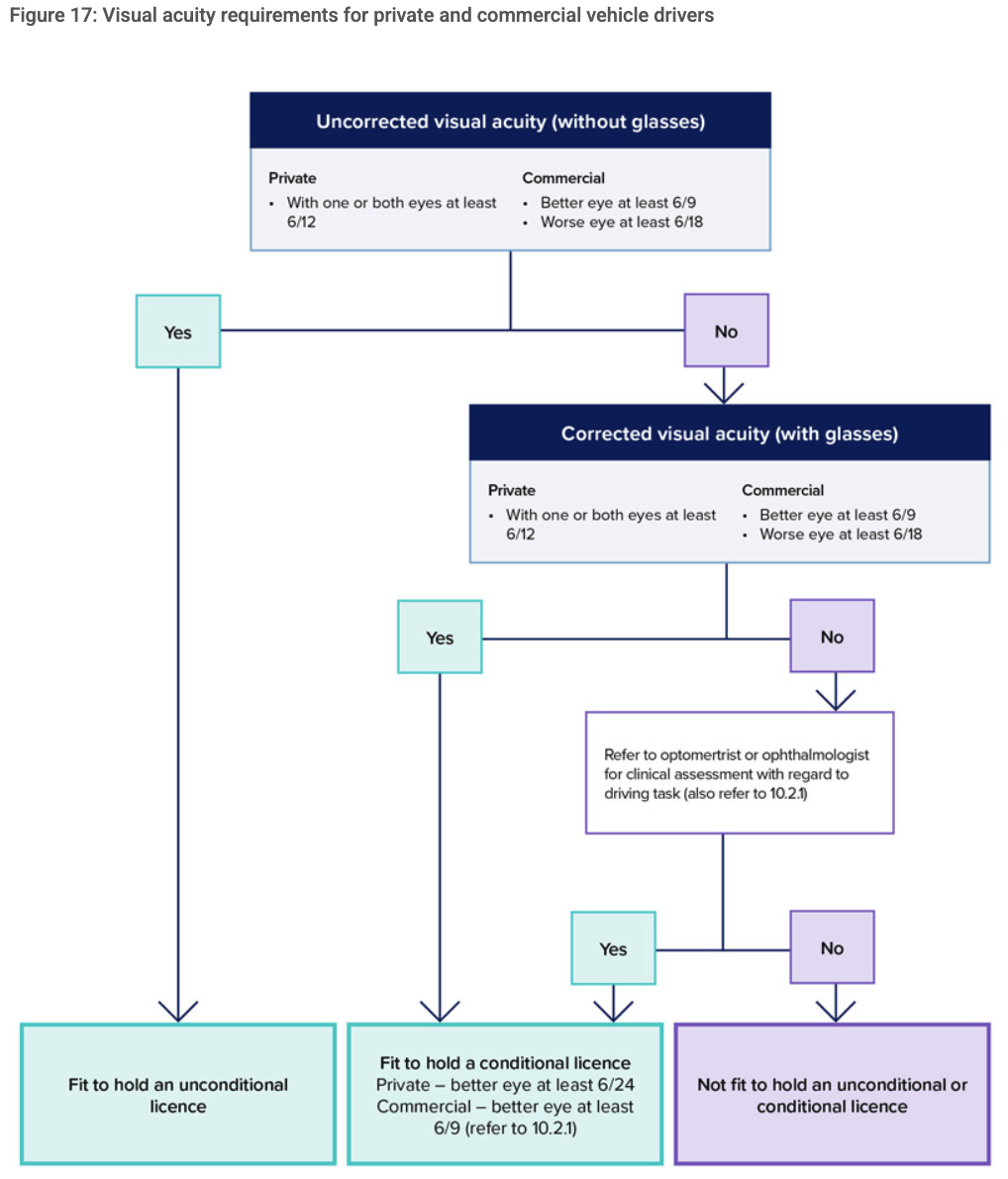
In the case of a private vehicle driver, if the person’s visual acuity is just below that required by the standard but the person is otherwise alert, has normal reaction times and good physical coordination, an optometrist or ophthalmologist can recommend the granting of a conditional licence. The use of contrast sensitivity or other specialised tests may help in the assessment. However, a driver licence will not be issued when visual acuity in the better eye is worse than 6/24 for private vehicle drivers.

There is also some flexibility for commercial vehicle drivers depending on the driving task, providing the visual acuity in the driver’s better eye (with or without corrective lenses) is 6/9 or better. Restrictions on driving (conditional licence) may be advised; for example, where glare is a marked problem, no-night driving may be recommended.

Figure 17: Visual acuity requirements for private and commercial vehicle drivers

Figure 17: Visual acuity flowchart for private and commercial vehicle drivers. Shows decision tree from uncorrected VA through corrected VA to outcomes: fit unconditional, fit conditional, or not fit.

Source: Austroads Assessing Fitness to Drive 2022, Figure 17. Reproduced for educational reference.

10.2.2 Visual fields

For the purposes of this publication, visual fields are defined as a measure of the extent of peripheral (side) vision. Normal visual field is: 60 degrees nasally, 100 degrees temporally, 75 degrees inferiorly and 60 degrees superiorly. The binocular field extends the horizontal extent from 160 to 200 degrees, with the central 120 degrees overlapping and providing the potential for stereopsis.

Visual fields may be reduced due to a range of neurological conditions (e.g. stroke, multiple sclerosis) as well by ocular diseases (e.g. glaucoma), or injuries, resulting in hemionopia, quadrantanopia or monocularity.

Peripheral vision assists the driver to be aware of the total driving environment. Once alerted, the central fovea area is moved to identify the importance of the information. Therefore, peripheral vision loss that is incomplete will still allow awareness; this includes small areas of loss and patchy loss. Additionally, affected drivers can adapt to the defect by scanning regularly and effectively and can have good awareness. Patients with visual field defects who have full intellectual/cognitive capacity are more able to adapt, but those with such impairments will have decreased awareness and are therefore not safe to drive.

A longstanding field defect, such as from childhood, may lead to visual adaptation. Such defects need to be assessed by an optometrist or ophthalmologist for a conditional licence to be considered. They should be managed as an exceptional case to the standard, with consideration for duration and evidence of visual adaptation, whether the location of the defect is an area that may already be blocked by the car door on the passenger side (i.e. the inferior field on the left side without central field loss), driver safety record and the nature of the driving task.

Assessment method

If there is no clinical indication of a visual field impairment or a progressive eye condition, then it is satisfactory to screen for defect by confrontation. Confrontation is an inexact test. Any person who has, or is suspected of having, a visual field defect should have a formal perimetry-based assessment.

Monocular automated static perimetry is the minimum baseline standard for visual field assessments. If monocular automated static perimetry shows no visual field defect, this information is sufficient to confirm that the standard is met.

Subjects with any significant field defect or a progressive eye condition require a binocular Esterman visual field for assessment. This is classically done on a Humphrey visual field analyser, but any machine that can be shown to be equivalent is accepted (e.g. Medmont binocular VF printed off in level map mode). The treating optometrist or ophthalmologist can determine whether it is appropriate for the person to wear their normal corrective lenses while undergoing testing. Fixation monitoring must be performed and recorded on the test. Alternative devices must have the ability to monitor fixation and to stimulate the same spots as the standard binocular Esterman. For an Esterman binocular chart to be considered reliable for licensing, the false-positive score must be no more than 20 per cent.

Horizontal extent of the visual field

In the case of a private vehicle driver, if the horizontal extension of a person’s visual fields are less than 110 degrees but greater or equal to 90 degrees, an optometrist or ophthalmologist may support the granting of a conditional licence by the driver licensing authority. The extent is measured on the Esterman from the last seen point to the next seen point. There is no flexibility in this regard for commercial vehicle drivers.

A single cluster of up to three adjoining missed points, unattached to any other area of defect, lying on or across the horizontal meridian will be disregarded when assessing the horizontal extension of the visual field. A vertical defect of only a single point width but of any length, unattached to any other area of defect, that touches or cuts through the horizontal meridian may be disregarded. There should be no significant defect in the binocular field that encroaches within 20 degrees of fixation above or below the horizontal meridian. This means that homonymous or bitemporal defects that come close to fixation, whether hemianopic or quadrantanopic, are not normally accepted as safe for driving.

Central field loss

Scattered single missed points or a single cluster of up to three adjoining points is acceptable central field loss for a person to hold an unconditional licence. A significant or unacceptable central field loss is defined as any of the following:

  • a cluster of four or more adjoining points that is either completely or partly within the central 20-degree area
  • loss consisting of both a single cluster of three adjoining missed points up to and including 20 degrees from fixation, and any additional separate missed point(s) within the central 20-degree area
  • any central loss that is an extension of a hemianopia or quadrantanopia of size greater than three missed points.

Methods of measuring visual fields are limited in their ability to resemble the demands of the real-world driving environment where drivers are free to move their eyes as required and must sustain their visual function in variable conditions. Additional factors to be considered by the driver licensing authority in assessing patients with defects in visual fields therefore include, but are not limited to, the following:

  • kinetic fields conducted on a Goldman
  • binocular Esterman visual fields conducted without fixation monitoring, often referred to as a roving Esterman (two consecutive tests must be performed with no more than one false-positive allowed) – the test should be in the numeric field format when it is printed out or sent for an opinion
  • contrast sensitivity and glare susceptibility
  • medical history; duration and prognosis; if the condition is progressive; rate of progression/deterioration; effectiveness of treatment/management
  • driving record before and since the occurrence of the defect
  • the nature of the driving task – for example, type of vehicle (truck, bus, etc.), roads and distances to be travelled
  • concomitant medical conditions such as cognitive impairment or impaired rotation of the neck.

There is no flexibility in this regard for commercial vehicle drivers.

Monocular vision (one-eyed driver)

Monocular drivers have a reduction of visual fields due to the nose obstructing the medial visual field. They also have no stereoscopic vision and may have other deficits in visual functions.

For private vehicle drivers, a conditional licence may be considered by the driver licensing authority if the horizontal visual field is 110 degrees and the visual acuity is satisfactory in the better eye. People with monocular vision are generally not fit to drive a commercial vehicle. A conditional licence may be considered by the driver licensing authority if the horizontal visual field is 140 degrees, the visual acuity in the better eye is satisfactory, there is no other visual field loss that is likely to impede driving and an ophthalmologist/optometrist assesses that the person may be safe to drive after consideration of the above factors. The better eye must be reviewed at least every two years.

If monocular automated static perimetry is undertaken on patients without symptoms, family history or risk factors for visual field loss, and shows no indication of any visual field concerns, this information may be sufficient to confirm that the standard is met. If monocular testing suggests a field defect, or if the patient has a progressive eye condition, and/or the patient has any other symptoms or signs that indicate a field defect, then binocular testing should be conducted using the Esterman binocular field test or an Esterman-equivalent test. Alternative devices must have the ability to monitor fixation and to stimulate the same spots as the standard binocular Esterman.

Sudden loss of unilateral vision

A person who has lost an eye or most of the vision in an eye on a long-term basis has to adapt to their new visual circumstances and re-establish depth perception. They should therefore be advised not to drive for an appropriate period after the onset of their sudden loss of vision (usually three months). They should notify the driver licensing authority and be assessed according to the relevant visual field standard.

10.2.3 Diplopia

People suffering from all but minor forms of diplopia are generally not fit to drive. Any person who reports or is suspected of experiencing diplopia within 20 degrees from central fixation should be referred for assessment by an optometrist or ophthalmologist. For diplopia managed with an occluder, a three-month non-driving period applies in order to re-establish depth perception.

10.2.4 Progressive eye conditions

The patient should be advised appropriately when a progressive eye condition is diagnosed that may result in future restrictions on driving. It is important to give the patient as much lead time as possible to prepare for changes that may later be required (e.g. adaptation to alternate transport and/or engaging blindness and low vision services).

People with progressive eye conditions such as cataract, glaucoma, optic neuropathy, diabetic retinopathy, macular degeneration or retinitis pigmentosa should be monitored regularly and should be advised in advance about the potential future impact on their driving ability.

10.2.5 Congenital and acquired nystagmus

Nystagmus may reduce visual acuity. Drivers with nystagmus must meet the visual acuity standard. Any underlying condition must be fully assessed to ensure there is no other issue that relates to fitness to drive. Those who have congenital nystagmus may have developed coping strategies that are compatible with safe driving and should be individually assessed by an appropriate specialist.

10.2.6 Colour vision

There is not a colour vision standard for drivers, either private or commercial. Doctors, optometrists and ophthalmologist should, however, advise drivers who have a significant colour vision deficiency about how this may affect their responsiveness to signal lights and the need to adapt their driving accordingly. Note, this standard applies only to driving within normal road rules and conditions. A standard requiring colour vision may be justified based on risk assessment for particular driving tasks.

10.2.7 Orthokeratology therapy

Orthokeratology involves the therapeutic use of rigid gas-permeable contact lenses worn overnight to reshape the cornea of the eye. This provides effective correction of visual refractive error (once the lenses are removed) that can last at least a full day. The therapeutic effect is temporary and so the lenses must be worn regularly to maintain the best visual outcomes.

A conditional licence can be considered for private and commercial vehicle drivers provided the visual acuity standard is met with orthokeratology therapy and the lenses are worn as recommended by an optometrist or ophthalmologist. The driver may drive without their normal correcting lenses (e.g. glasses or contact lens) provided that the visual acuity standard is maintained with the support of orthokeratology therapy. If the driver cannot meet or maintain the standard using orthokeratology therapy, they must drive with correcting lenses that enable them to meet the standard.

10.2.8 Telescopic lenses (bioptic telescopes)

The driver licensing authority may refuse a licence if the visual acuity standards are not met without the use of a bioptic telescope. People seeking to use a bioptic device for driving should first contact their driver licensing authority and check whether these devices are an accepted means to meet the standards.

Bioptic telescopes are devices used to compensate for reduced visual acuity. They are miniature telescopes typically mounted on the upper part of a person’s glasses. Bioptics are used momentarily and intermittently when driving, the majority of which occurs at the corrected visual acuity provided by the person’s glasses. The person drops their chin slightly to view through the telescope for magnification, then lifts their chin to view through their standard corrective lens.

At present, there is insufficient information from human factors and safety research of drivers using these devices to set standards for bioptics. As such, and due to the increased risk associated with commercial vehicle driving, these devices should not be used to meet the visual acuity standards for commercial vehicles. For private vehicle drivers, the driver licensing authority may consider information from an assessment performed by an ophthalmologist or optometrist when making its licensing decision.

10.2.9 Practical driver assessments

A practical driver assessment is not considered to be a safe or reliable method of assessing the effects of disorders of vision on driving, especially the visual fields, because the driver’s response to emergency situations or various environmental conditions cannot be determined. Information about adaptation to visual field defects can be gained from visual field tests such as the Esterman.

A practical driver assessment may be helpful in assessing the ability to process visual information.

10.2.10 Exceptional cases

In unusual circumstances, cases may be referred by the driver licensing authority for further medical specialist opinion.

Section 4.4 — Conditional licences

Source:Reproduced from Austroads Assessing Fitness to Drive 2022, section 4.4 (Conditional licences). © Austroads. Official source: online chapter or PDF version. Austroads may show a browser verification screen before loading. DRIVE Fields applies these rules but is not affiliated with Austroads.

A conditional licence provides a mechanism for optimising driver and public safety while maintaining driver independence when a driver has a long-term or progressive health condition or injury that may affect their ability to drive safely. A conditional licence permits the driver to drive in conditions that suit their capability – for example, no night driving, only driving in familiar areas (local area restriction) or having to wear corrective lenses.

The health professional can support a patient in making an application for a conditional licence by indicating the patient’s driving needs, but the final decision rests with the driver licensing authority.

Conditional licences should be subject to periodic review so the medical condition, disability or treatment, including the compliance with treatments, can be monitored. The frequency of formal review regarding licence status is sometimes specified in this publication but often is left to the judgement of the health professional, given the variations in severity and stability of a medical condition, disability or treatment and the possible effects on driving.

At the time of a periodic review or during general management of a patient’s condition, it may become apparent that the patient no longer meets the requirements of the conditional licence because their health has deteriorated for some reason. The patient should be advised to inform the driver licensing authority of their changed circumstances with respect to fitness to drive.

In addition to the examples in Table 4, the driver licensing authority may consider issuing a conditional commercial vehicle licence – for example, in certain circumstances or situations where crash risk exposure can be managed. A case-by-case risk assessment is required that considers relevant factors including driver insight, stability of the health condition, treatment compliance, nature of goods being transported, size/complexity of the vehicle and periodic review requirements.

In the case of commercial vehicle drivers, the opinion of a medical specialist is generally required for consideration of a conditional licence – the main exceptions to this are set out in the next paragraph and in section 4.4.7.

In areas where access to specialists may be difficult, the driver licensing authority may agree to a process in which:

  • initial assessment and advice for the conditional licence is provided by a specialist
  • ongoing periodic review for the conditional licence is provided by the treating general practitioner, with the cooperation of the specialist.

Where appropriate, telemedicine is encouraged to facilitate access to specialist opinion.

Examples of licence conditions (Table 4)

Austroads Table 4 provides examples of licence conditions, restrictions, or vehicle modifications that the driver licensing authority may apply. These are not mandatory requirements and the available codes vary between Australian states and territories. The licensing authority determines which conditions apply in each case.

Vehicle/equipment conditions (typically appear as codes on the licence)

  • Must wear corrective lenses (spectacles or contact lenses) at all times when driving
  • Automatic transmission only
  • Hand controls or other steering/control modifications
  • Other vehicle modifications as specified

Driving restrictions

  • Daylight driving only (no driving between sunset and sunrise)
  • Driving during off-peak hours only
  • Local area / familiar roads only (no kilometre figure)
  • Kilometre radius restriction from the driver’s registered home address (commonly 5, 10, 15, 20, 25 or 50 km)
  • No freeway or motorway driving
  • No carrying of passengers

Advisory conditions (may not appear on the actual licence)

  • Take medication as prescribed
  • Do not drive more than a specified number of hours in any 24-hour period
  • Periodic medical, ophthalmological, or optometric review at a stated interval
Conditions commonly applied for visual-field impairment

DRIVE Fields does not prescribe conditions – the licensing authority decides. For clinician reference, the conditions most commonly applied to drivers with a measured visual-field deficit are:

  • Corrective lenses (where visual acuity is also borderline)
  • Daylight driving only
  • Driving during off-peak hours only
  • Local area or kilometre radius restriction (e.g. within 10–25 km of home)
  • No freeway or motorway driving
  • Annual ophthalmological or optometric review

When recommending a conditional licence, the clinician’s letter to the authority can list the specific conditions they consider appropriate. The authority weighs the recommendation alongside the clinical evidence and the driving task.

FAQAbout DRIVE Fields, privacy, common questions, and feedback

Decision support only

The driver licensing authority makes the final licensing decision. This tool helps clinicians apply Austroads rules consistently; it does not replace clinical judgment. The clinician remains responsible for the final assessment and any report sent to the licensing authority.

Privacy: clinical data stays on your device

Every assessment runs entirely in your browser. After the first page load, clicking, marking points, and generating a report make no further network calls. Patient details, missed points, reliability values, and test results are not uploaded to DRIVE Fields. The public site is hosted on Cloudflare, so Cloudflare receives ordinary page requests and may provide aggregate page-load analytics if enabled, but no visual-field entries or reports are sent.

Future Austroads changes

DRIVE Fields applies the current Austroads visual-field standards as implemented at the time of use. Austroads standards are periodically reviewed, and future changes may alter visual-field interpretation. Confirm the current standard and use clinical judgement, especially for borderline, artefact-prone, commercial, monocular, or complex cases.

Authority and version

All rules trace to Austroads “Assessing Fitness to Drive” 2022, section 10.2. The app uses supported device-specific point layouts where available and keeps unconfirmed non-Humphrey pathways in manual review until tested spots, reliability evidence, and licensing acceptability are clear.

DRIVE Fields v0.4.43. Built by Dr Simon Chen FRANZCO · Sydney.

Frequently Asked Questions

Where does my patient data go?

DRIVE Fields runs the assessment in your browser. After the first page load, clicking, marking points, and generating a report make no further network calls. There is no app assessment backend and no case database. The clinical entries you enter (missed points, false-positive rate, licence type, State or territory, field layout, and printout source) stay in your browser tab and are gone when you close it. DRIVE Fields does not receive them, store them, or send them to an assessment server. The public site is hosted on Cloudflare, which receives normal website requests and may provide aggregate page-load analytics if enabled; that does not include the clinical entries or generated report.

Do you store anything?

Three convenience preferences only, in your browser’s local storage: the last State or territory you selected, the last field layout, and the last printout source. These are remembered automatically so you don’t have to re-enter them next session. No patient data, no missed-point selections, no test results, and no assessment outcomes are stored anywhere. The preferences are readable only by you, are not uploaded to DRIVE Fields, and you can clear them via your browser’s “Clear site data” option.

Can I cite this in my report to the licensing authority?

Yes. The result panel shows the specific Austroads section the verdict draws from, so you can quote the same clause in your report. Before citing or submitting a DRIVE Fields report, check that the grid points marked in DRIVE Fields match the original visual field printout, because manual transcription errors can change the result. Always describe DRIVE Fields as a decision-support tool, not as the basis for the determination. The clinical judgement stays yours; the licensing decision stays the authority’s.

Does DRIVE Fields make the licensing decision?

No. DRIVE Fields applies the rules in Austroads section 10.2 to the data you enter and shows what those rules indicate. The decision to issue, restrict, or refuse a licence rests with the State or territory licensing authority. Your clinical judgement is always in the loop, and a “manual review required” verdict means the rules can’t be applied confidently and you decide.

Where are the clinical learning notes about Esterman, roving tests, and devices?

The Learning and CPD Centre carries the clinical teaching so the FAQ can stay brief. Open Learning and CPD Centre for the Esterman grid anatomy, roving Esterman pathway, device and printout guide, common interpretation traps, glossary, and demo-case learning notes.

What does fixation monitoring actually mean?

Fixation monitoring means the test, report, or clinical record documents that the patient kept looking at the fixation target while peripheral stimuli were presented. The field is meant to test what the patient detects while looking straight ahead, not what they can find by scanning around the display.

For Australian driver licensing, Austroads Section 10.2 treats fixation monitoring as part of the reliability gate for a standard binocular Esterman or Esterman-equivalent test. Alternative devices need to stimulate the required spots and have a way to monitor fixation. The false-positive score also needs to be no more than 20 percent for the Esterman chart to be considered reliable for licensing.

The method varies by device. Humphrey HFA binocular Esterman does not provide the same automatic fixation monitoring used in some monocular fields, so fixation is usually manually observed and documented. Melbourne Rapid Fields uses webcam eye-image analysis and a gaze fixation stability plot when supported and enabled. Monocular blind-spot catch trials and false-positive or false-negative catch trials are useful reliability checks, but they are not the same as proving where the patient was looking during a binocular driving field.

A missing gaze plot, fixation-loss line, eye-tracking statement, or manual-observation note is therefore not a small formatting issue. In NSW, many clinicians still say RMS, but the current authority is Transport for NSW; the clinician still needs defensible evidence behind the signed report. If fixation is missing, unknown, disabled, or not recorded, repeat the test with fixation recorded, use the proper roving Esterman pathway where appropriate, or treat the result as manual review or Insufficient Evidence rather than a clean standard Esterman result.

The full teaching section is in Learning and CPD Centre.

Can I use the grid without a mouse or touchscreen?

Yes. The grid includes keyboard and accessibility controls for people using a keyboard, switch control, screen reader, or external keyboard on an iPad. This is just another way to enter the same missed points; it does not change the assessment.

Tab to the visual-field grid, then use the arrow keys to move between tested points. Press Space or Enter to toggle the selected point, M to mark it missed, or S to mark it seen. For most clinics, clicking or dragging across points remains the fastest method.

Why am I getting “manual review required”?

Manual review is now reserved for cases where the evidence is not strong enough for the rules to be applied confidently. Common reasons:

  • False-positive rate above 20% (reliability not established)
  • Fixation monitoring not recorded
  • Unknown or mismatched device, layout, or printout pattern
  • Atypical missed-point pattern that doesn’t match the cluster definitions
  • A finding the engine is conservative about

For coordinate-confirmed non-Humphrey devices, the app can show the calculated assessment outcome on the matching layout. For unconfirmed devices or printouts that do not match the selected grid, manual review remains the safest pathway. Your clinical assessment still decides whether that printout is acceptable evidence for the licensing authority.

Who built this and why is it free?

DRIVE Fields was built by Dr Simon Chen FRANZCO, a Sydney-based ophthalmologist, because consistent, referenced visual-field assessments save time in busy clinics and reduce variability between clinicians. It is free, will stay free, and exists as a clinical contribution rather than a business. No monetisation is planned.

Finding DRIVE Fields again

The official website is www.drivefields.com.au. If you cannot remember the address, useful search phrases are DRIVE Fields, Drivefields, Drive Fields app, Simon Chen app, Simon Chen visual field app, Austroads visual field assessment, and Esterman driving visual field calculator.

Will it ever become paid?

No. DRIVE Fields is free forever. There is no subscription, no premium tier, and no plan to introduce one. If you want to support the work, share it with a colleague.

How do I install it as an app on my phone or computer?

You don’t have to install anything; the URL works in any browser. If you want it to feel like an app on your home screen or dock:

Phone

  • iPhone or iPad (Safari): tap the Share button, then “Add to Home Screen.”
  • Android (Chrome): tap the menu (⋮), then “Install app” or “Add to Home Screen.”

Desktop

  • Chrome or Edge (Windows, macOS, Linux): click the install icon in the address bar, or open the menu and choose “Install DRIVE Fields.”
  • Safari (macOS Sonoma 14 or later): open the File menu and choose “Add to Dock,” or click the Share button and choose “Add to Dock.”
  • Firefox: Firefox no longer supports installing websites as apps on desktop. The simplest alternative is a desktop shortcut: drag the URL from the address bar onto your desktop, or pin a bookmark to your toolbar for one-click access.

Once installed, the app opens in its own window and behaves like any other application.

Do I need an internet connection to use it?

You need internet the first time you load the page. After that, the assessment itself runs entirely in your browser. Marking points, entering test details, and running an assessment work without any further network calls; nothing is uploaded or downloaded during use.

Most return visits will also work offline because your browser caches the app after the first load, though this isn’t guaranteed across browser updates or if you clear your cache. Installing it as a web app (see the question above) usually makes the offline behaviour more reliable.

Send feedback

Report bugs or errors, suggest improvements, or request support for a device or printout.

If you need to attach a visual-field printout or report, please send a de-identified file by email to feedback@drivefields.com.au.

Please do not include patient identifiers. If the issue depends on a printout, send only de-identified details.

This opens an email draft. Attach de-identified reports in your email app if needed.

Prefer to write directly? Email feedback@drivefields.com.au.